Mergify Queue Command
Add a pull request to a merge queue.
The queue command in Mergify offers users a direct way to interact with the
Mergify merge queue, right from their pull request
comments. With this command, users can add a pull request to a merge
queue or re-add it after it has been dequeued.
To enter a queue, a pull request must match the queue_conditions of the
targeted queue. See Adding a Pull Request to the Merge
Queue for
more details.
Syntax
Section titled Syntax@mergifyio queue [queue-name]Parameters
Section titled Parameters[queue-name]is an optional queue name. If no queue name is specified, the pull request will be queued in the first queue that matches thequeue_conditions.
Example
Section titled ExampleAdding a Pull Request to a Queue
Section titled Adding a Pull Request to a QueueTo add a pull request to a queue, simply use:
@mergifyio queueThis command will place the pull request in the first queue that matches
queue_conditions.
Adding a Pull Request to a Specific Queue
Section titled Adding a Pull Request to a Specific QueueTo add a pull request to a specific queue, simply use:
@mergifyio queue productionThis command will place the pull request in the production queue as soon as
it passes its queue_conditions.
Re-queuing a Previously Dequeued Pull Request
Section titled Re-queuing a Previously Dequeued Pull RequestIf a pull request was removed from the merge queue (due to a failed check, a
flaky test, or a manual dequeue), you can re-add it using the same queue
command:
@mergifyio queueThe command resets the pull request status and places it back in the merge queue, allowing Mergify to retry validation.
Queueing with a Checkbox
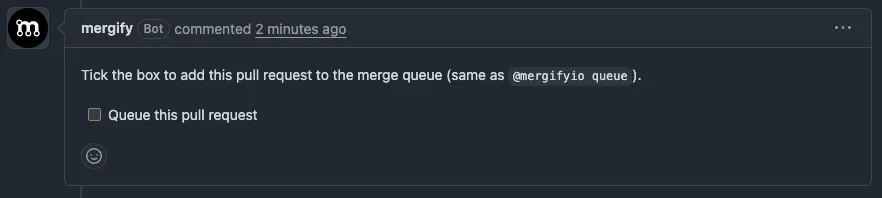
Section titled Queueing with a CheckboxIf you’d rather not type a command, Mergify can post a checkbox you can tick to queue your pull request:
-
Queue this pull request comes in a comment of its own, posted when the pull request is ready to be queued and isn’t queued yet. Tick it to add the pull request to the merge queue.
-
Requeue this pull request comes in the merge queue status comment, after the pull request has left the queue without being merged. Tick it to put the pull request back in the queue.
Ticking a checkbox does exactly what the @mergifyio queue command does. The
action is attributed to the person who ticked it, and the same
command restrictions and write-permission checks
apply, so a checkbox can’t queue a pull request that the person couldn’t queue
manually.
This is enabled by default. To turn it off, set queue_controls_comment to
false in your merge_queue configuration:
merge_queue: queue_controls_comment: falseWas this page helpful?
Thanks for your feedback!